markdown
My day job is building agent auth infrastructure for enterprises. But this guide to AI agent security isn't just for enterprise teams.
I'm seeing everyone jump in right now. Developers spinning up agents with OpenClaw, Claude Code, Cursor. People building their first MCP server over a weekend. Hobbyists wiring up home automation agents. And most of them are doing the same thing: grabbing an API key, pasting it into a `.env` file, and moving on to the interesting part.
That's fine. Seriously. **You don't need to wait for enterprise-grade solutions to start building agents.** There are simple agent security best practices you can use today that take five minutes and keep you out of trouble. At minimum: don't hardcode secrets in your code. That's the floor.
This guide covers everything from that floor to the ceiling (zero trust AI agent architectures). It walks through eight agent credential patterns, from `.env` files to MCP tool authentication with full credential isolation. Wherever you are, whatever you're building, it should give you options and the risks that come with each. As you grow, you can migrate from one pattern to the next.
**If you're starting a new agent project**, copy this page as a markdown file and give it to your agent or your team. Based on where you are and what you're trying to achieve, it should point you to the right approach without wasting your time.
## Where Do AI Agent Credentials Live in an Agent System?
Before getting into credential management patterns, let's look at the layers of a typical agent system and understand where credentials actually sit.
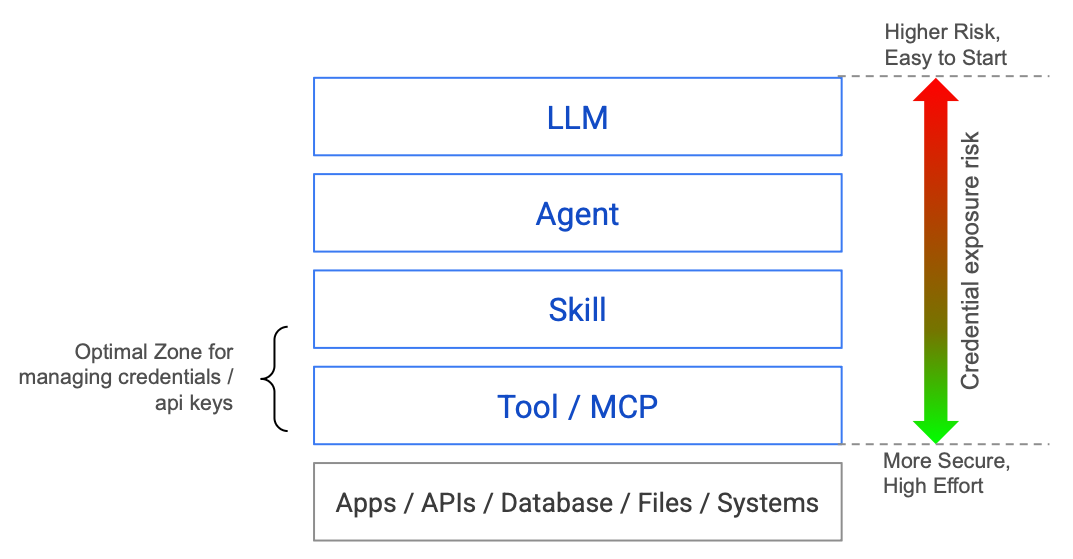
The higher up in this stack your credentials live, the more exposed they are. It's easy to start with credentials at the top (just load them in your agent process), but the risk is highest there. Push them down toward the Tool / MCP layer and you get more security, at the cost of more effort.
The best place for credentials is the Tool layer, where tool runtime security can enforce isolation. In some cases, the Skills layer is acceptable (for example, a skill that wraps a single API with a scoped key). But the further down you push, the better.
In most agent setups today, credentials leak upward. They sit in environment variables the entire process can read. A prompt injection at the LLM layer can reach down and grab credentials that should only exist at the Tool layer.
Every pattern in this guide is about how far down you push credentials, and how completely you isolate them from the upper layers. If you're wondering how to secure AI agents, that's the core question.
Now let's walk through them, starting from the simplest.
## Quick Start: Jump to Your Pattern
No need to read all eight. Pick your starting point:
| You are... | Scale | Start at |
|---|---|---|
|**Building your first agent, any experience level** | 1 user, few tools | [Pattern 1-3](#pattern-1-parameterized-credentials-env-files). Get something working. |
|**API keys / service accounts only, going to production** | Few users, limited tools | [Pattern 4](#pattern-4-secrets-managers-vault-aws-secrets-manager-gcp-secret-manager). Skip OAuth if you don't need it. |
|**Need OAuth / user-delegated access** | Multiple users | [Pattern 5-6](#pattern-5-oauth-with-stored-tokens). Token lifecycle matters here. |
|**Enterprise architect or security engineer** | At scale, compliance | [Pattern 7](#pattern-7-the-tool--mcp-runtime). Handles both API keys and OAuth. |
|**Leader evaluating agent platforms** | Any | [Decision matrix + vendor checklist](#where-do-you-start) at the bottom. |
## Two Types of AI Agent Credentials
Before diving into patterns, it helps to know that agents deal with two kinds of credentials:
**Static credentials:** API keys, service account keys, client ID/secret pairs, database passwords. You get them once, store them somewhere, and use them until you rotate them. Most agent projects start here.
**OAuth / delegated tokens:** Access tokens and refresh tokens issued through user consent flows. They expire, need refreshing, and represent a *user's* permission rather than a *system's* permission.
Patterns 1-4 are primarily about where you **store static credentials** (from .env files to Secrets Managers). Pattern 4 (Secrets Manager) works for AI agent API key management and OAuth client credentials alike.
Patterns 5-6 specifically address **OAuth for AI agents and token lifecycle**. If your agent only uses API keys and service accounts, you can skip straight from Pattern 4 to Pattern 7.
Pattern 7 (Tool / MCP Runtime) handles **both types transparently** through MCP credential management. The agent doesn't care whether a tool needs an API key or an OAuth token. The tool runtime figures it out.
## Pattern 1: Parameterized Credentials (`.env` Files)
### How It Works
The absolute minimum for AI agent API key management. Instead of putting credentials directly in your code, you put them in a `.env` file and load them at startup. This is the most common pattern in prototypes and tutorials, and it's where the vast majority of agent projects live today.
```python
# .env (separate file, excluded from git via .gitignore)
OPENAI_API_KEY=sk-proj-abc123...
STRIPE_SECRET_KEY=sk_live_...
DATABASE_URL=postgres://admin:password@prod-db:5432/main
# agent.py
import os
from dotenv import load_dotenv
load_dotenv()
stripe.api_key = os.environ["STRIPE_SECRET_KEY"]
```
**The real floor is even simpler: never put a credential in your source code.** No API key in a Python string. No token in a config file that gets committed to git. If you do nothing else, do this. A `.env` file with a `.gitignore` entry is the minimum viable separation.
### When It's Acceptable
Local development. Personal projects. Hackathons. Single-user tools where you *are* the only operator. A [recent audit](https://grantex.dev/report/state-of-agent-security-2026) found this is where 93% of agent projects stop, and most never move beyond it.
### The AI Agent Security Risk Profile
For a traditional app, `.env` files are a known-acceptable risk in development. For agents, the calculus shifts dramatically:
**The agent can read the environment.** If your agent has access to `os.environ` (and most do, since they're running your Python process), a prompt injection can exfiltrate those values. This isn't theoretical. The [seminal indirect prompt injection paper](https://arxiv.org/abs/2302.12173) (Greshake et al., 2023) demonstrated that agents can be instructed to dump environment variables and send them to attacker-controlled endpoints. Its authors noted: *"Prompt injections can be as powerful as arbitrary code execution."*
**The Google Antigravity incident proved this at scale.** In 2025, PromptArmor showed that a poisoned web source (an integration guide with hidden prompt injection in 1-point font) could manipulate Google's Antigravity IDE into: (a) collecting credentials from `.env` files by *bypassing its own gitignore protections* using terminal commands, (b) constructing a URL with the encoded credentials, and (c) using a browser subagent to exfiltrate the data. This hit [768 points on Hacker News](https://news.ycombinator.com/item?id=46048996).
**Credential scope is typically too broad.** That `STRIPE_SECRET_KEY` can do anything: create charges, issue refunds, read customer data. The agent might only need to create invoices. But the key doesn't know that.
**No audit trail.** You can't distinguish between the agent using the key and a human using the key. When something goes wrong (and it will), forensics is a nightmare.
**Verdict: Fine for learning and local experiments. Never in production. When you're ready to deploy, move to Pattern 3.**
## Pattern 2: Filesystem Permissions (`chmod`)
### How It Works
A step up from raw `.env` files. You restrict who can read the secrets file using Unix permissions.
```bash
# Create a secrets file readable only by the agent's service user
echo "STRIPE_KEY=sk_live_..." > /etc/agent/secrets
chmod 600 /etc/agent/secrets
chown agent-svc:agent-svc /etc/agent/secrets
```
### When It's Acceptable
Single-machine deployments where you control the OS. Situations where you need something better than `.env` but can't justify infrastructure. This is the security equivalent of locking your front door but leaving the garage open.
### Why It Doesn't Solve the Agent Problem
Filesystem permissions protect against *other users on the same machine*. They do nothing against:
- The agent process itself (which needs read access to function)
- Container escapes (the permission boundary is the container, not the file)
- Memory dumps of the running process
- The agent being instructed to read and relay file contents
The [Antigravity attack](#pattern-1-parameterized-credentials-env-files) from Pattern 1 proves this: Gemini bypassed file-level protections by using `cat` from the terminal instead. Filesystem permissions are a *process boundary*, not a *trust boundary*.
**Verdict: Better than nothing, but don't let it give you false confidence. When you're deploying beyond a single machine, move to Pattern 3 or 4.**
## Pattern 3: Environment Variables in Containers/CI
### How It Works
The modern version of Pattern 1. Secrets are injected as environment variables at deploy time via your orchestrator (Kubernetes, ECS, Docker Compose) or CI system (GitHub Actions, GitLab CI).
```yaml
# kubernetes deployment
spec:
containers:
- name: agent
env:
- name: STRIPE_KEY
valueFrom:
secretKeyRef:
name: stripe-secrets
key: api-key
```
### When It's Acceptable
Production deployments where secrets management infrastructure exists. CI/CD pipelines for agent testing. When combined with secret rotation and monitoring. This is where most "production" agent deployments sit today.
### The Agent-Specific Risk
What you get:
**What you gain:** Secrets aren't in source code. They're managed by your orchestrator. Rotation is possible. Access is auditable at the infrastructure level.
**What you don't gain:** Any protection against the agent *itself* misusing the credential. The secret is still a plaintext string in the process's memory. The agent runtime has full access.
```
┌─────────────────────────────────────┐
│ Agent Process Memory │
│ ┌───────────────────────────────┐ │
│ │ STRIPE_KEY = sk_live_... │ │
│ │ DB_PASSWORD = hunter2 │ │
│ │ GITHUB_TOKEN = ghp_... │ │
│ └───────────────────────────────┘ │
│ │
│ LLM can access os.environ ────────────> Exfiltration risk
│ Tool code can log values ────────────> Log leak risk
│ Process dump exposes all ────────────> Memory attack risk
└─────────────────────────────────────┘
```
The [Slack AI vulnerability](https://promptarmor.substack.com/p/data-exfiltration-from-slack-ai-via) is instructive here. Slack's AI had access to channel data through its runtime environment. An attacker could inject prompts into channel messages that would instruct Slack AI to exfiltrate data from *private channels* the attacker didn't have access to, because the AI operated with broader permissions than any individual user. Same credential, different trust model.
**Verdict: Table stakes for production. If your agent does one thing with one tool, this is genuinely enough with tight scopes. When you start adding tools or users, look at Pattern 4 for better management or Pattern 6 to time-bound your risk.**
## Pattern 4: Secrets Managers (Vault, AWS Secrets Manager, GCP Secret Manager)
### How It Works
Instead of injecting secrets as environment variables, the agent fetches them at runtime from a centralized secrets manager with access controls, audit logging, and automatic rotation.
```python
import boto3
def get_secret(secret_name: str) -> str:
client = boto3.client('secretsmanager')
response = client.get_secret_value(SecretId=secret_name)
return response['SecretString']
# Agent fetches secret only when needed
stripe_key = get_secret("prod/stripe/api-key")
```
### What You Gain
- **Centralized access control.** IAM policies determine which agents can access which secrets.
- **Audit logging.** Every secret access is logged with identity, timestamp, and source IP.
- **Automatic rotation.** Secrets can be rotated without redeploying agents.
- **Encryption at rest.** Secrets are encrypted in the manager, not sitting in plaintext config.
### The Agent-Specific Gap
Once the agent *fetches* the secret, you're back to Pattern 3. The secret is in process memory. The agent's LLM can access it. The same exfiltration risks apply.
You've improved the *supply chain* (how secrets get to the agent). You haven't changed the *consumption model*: the agent still holds plaintext credentials.
There's also a subtler problem: **scope creep.** In traditional apps, a service fetches a small set of secrets at startup. An agent might fetch dozens of secrets across its lifetime as it dynamically selects tools. Each fetch expands the attack surface. If the agent is compromised mid-session, every secret it has ever fetched is exposed.
The [Moltbook breach](https://grantex.dev/report/state-of-agent-security-2026) demonstrated the cascading impact of centralized credential storage: 1.5 million API authentication tokens and 35,000 email addresses were exposed in a single breach. When your credential store becomes a honeypot, the question isn't *if* it'll be targeted, but *when*.
**Verdict: Significant improvement in management and auditability. Good for single-user agents with moderate tool usage. When your agents start handling multiple users' data, the "agent holds plaintext credential" problem becomes real. That's when you look at Pattern 6 or 7.**
## Pattern 5: OAuth with Stored Tokens
### How It Works
Instead of static API keys, the agent uses OAuth 2.0 tokens. The user authorizes the agent via a consent flow, and the agent stores the resulting access and refresh tokens.
```python
class TokenStore:
def get_token(self, user_id: str, service: str) -> dict:
row = db.query(
"SELECT access_token, refresh_token, expires_at "
"FROM oauth_tokens WHERE user_id=? AND service=?",
user_id, service
)
if row.expires_at < now():
return self.refresh(row.refresh_token)
return row.access_token
```
### Why This Is the Default "Production" Pattern
OAuth is the right *protocol* for delegated access. The user explicitly consents. Scopes limit what the agent can do. Tokens can be revoked. This is substantially better than API keys.
Most agent platforms land here. The current standard is OAuth 2.1 with mandatory PKCE (Proof Key for Code Exchange), which prevents authorization code interception attacks. If your platform doesn't support PKCE, that's a red flag, especially for headless agents that can't securely store a client secret.
### The Refresh Token Problem
Here's where it gets messy. OAuth access tokens expire (typically 1 hour). To keep working, the agent needs a refresh token, a long-lived credential that can mint new access tokens.
**Refresh tokens are skeleton keys.** They don't expire (or expire after months). They can generate unlimited access tokens. If a refresh token is compromised, the attacker has persistent access until the user explicitly revokes it.
And now you need to store these refresh tokens somewhere, which brings you right back to the secrets management problem, except with a credential that's arguably *more* powerful than a static API key because it's scoped to a specific user's data.
```mermaid
sequenceDiagram
participant User
participant Agent
participant IdP as OAuth Provider
participant DB as Token Store
User->>Agent: Grant consent
Agent->>IdP: Exchange auth code
IdP-->>Agent: Access token + Refresh token
Agent->>DB: Store both tokens
Note over DB: High-value target.<br/>Compromise = persistent access<br/>to all users' data
Agent->>IdP: API call with access token
Note over Agent: Token expires (1hr typical)
Agent->>DB: Fetch refresh token
Agent->>IdP: Refresh → new access token
IdP-->>Agent: New access token (maybe rotated refresh)
Agent->>DB: Update stored tokens
Note over Agent,DB: This cycle repeats forever.<br/>Miss a rotation? User re-auths.
```
### The Lifecycle Hell
In production, refresh token management becomes its own infrastructure:
- **Token rotation:** Some providers rotate refresh tokens on every use (Google). Miss a rotation? Token invalidated. User has to re-auth. The security best practice, [refresh token rotation](https://datatracker.ietf.org/doc/html/draft-ietf-oauth-security-topics) where a new refresh token is issued with every access token refresh, adds operational complexity that most teams underestimate.
- **Concurrent access:** Two agent instances refresh the same token simultaneously. One gets the new token, the other's is now invalid. Race condition.
- **Provider diversity:** Every OAuth provider has slightly different behavior. Google, Microsoft, Salesforce, GitHub, all have different token lifetimes, rotation policies, and error codes.
- **Revocation detection:** How do you know a user revoked access? You find out when your next API call fails. Now what?
I've seen teams spend more engineering time on refresh token lifecycle management than on the actual agent logic.
**Verdict: Right protocol, wrong trust model for agents. The agent becomes a high-value credential store.**
>**Pattern 5 vs 6, the key difference:** In Pattern 5, your agent stores refresh tokens and manages the full lifecycle (rotation, expiry, concurrent access). In Pattern 6, a broker mints short-lived tokens on demand. The agent gets a token that expires in minutes and never stores anything persistent. Same protocol (OAuth), fundamentally different trust model.
## Pattern 6: JIT Authentication for Agents (Short-Lived Tokens)
>**Tip:** Pattern 6 is the natural evolution of Pattern 5. If you've already built OAuth for AI agents, JIT authentication is what you get when you stop storing tokens and start generating them on demand. The protocol stays the same. The trust model changes.
### How JIT Authentication Agents Work
Instead of storing long-lived tokens, the system generates short-lived credentials at the moment they're needed. The agent never holds a credential longer than a single operation.
```python
# Instead of:
token = token_store.get_persistent_token(user_id, "github")
# You do:
token = credential_broker.issue_jit_token(
user_id=user_id,
service="github",
scopes=["repo:read"],
ttl=300, # 5 minutes
operation="list_pull_requests"
)
# Token auto-expires. No refresh. No storage.
```
```mermaid
sequenceDiagram
participant Agent
participant Broker as Credential Broker
participant IdP as Identity Provider
participant GitHub
Agent->>Broker: Need GitHub access for user X<br/>scope: repo:read, ttl: 5min
Broker->>Broker: Verify agent identity<br/>Check policy: can this agent<br/>request this scope?
Broker->>IdP: Mint short-lived token<br/>for user X, scope: repo:read
IdP-->>Broker: Short-lived access token
Broker-->>Agent: Token (expires in 5 min)
Agent->>GitHub: List PRs
GitHub-->>Agent: PR data
Note over Agent: Token expires automatically.<br/>No refresh token ever issued.
```
### What Changes
This is a meaningful architectural shift:
- **Blast radius is time-bounded.** A leaked credential is useless in 5 minutes.
- **Scope is operation-specific.** The token can only do what's needed for this specific action. Modern standards like [Rich Authorization Requests (RAR)](https://datatracker.ietf.org/doc/html/rfc9396) allow agents to request just-in-time, specific permissions for a single action rather than broad standing access.
- **No credential storage.** The agent doesn't maintain a token database. No refresh tokens. No rotation complexity.
- **Audit granularity.** Every credential issuance is a logged event tied to a specific operation.
### Implementation Approaches
**GitHub Apps with installation tokens:** GitHub Apps can mint short-lived tokens scoped to specific repositories and permissions. TTL is 1 hour, but you can architect around this.
**AWS STS (Security Token Service):** `AssumeRole` generates temporary credentials with custom TTL and policy. This is JIT for AWS resources.
```python
# AWS STS example
sts = boto3.client('sts')
response = sts.assume_role(
RoleArn='arn:aws:iam::123456789:role/agent-github-reader',
RoleSessionName=f'agent-{user_id}-{operation_id}',
DurationSeconds=900, # 15 minutes
Policy=json.dumps({
"Version": "2012-10-17",
"Statement": [{
"Effect": "Allow",
"Action": ["codecommit:GitPull"],
"Resource": [f"arn:aws:codecommit:*:*:{repo_name}"]
}]
})
)
temp_credentials = response['Credentials']
```
**Google's downscoped tokens:** Exchange a broad token for a narrow one with limited scope and TTL.
### The Gap
JIT issuance solves the *time* dimension but doesn't fully solve the *trust* dimension. The agent still receives and uses the credential. During that 5-minute window, the credential is in the agent's memory and subject to the same exfiltration risks.
You've narrowed the window dramatically, and that matters for real risk reduction, but the fundamental architecture is still "agent holds credential."
**Verdict: Major improvement. Time-bounding and scope-narrowing are real security gains. This is where serious teams should start. If you need the credential completely out of the agent's hands, Pattern 7 is the next step.**
## Pattern 7: The Tool / MCP Runtime (MCP Server Security)
### The Core Insight
If you've followed the patterns so far, you've probably noticed something: credentials are only ever needed at the Tool layer. The LLM doesn't use them. The Agent doesn't use them. Skills don't use them. Only tools execute API calls, and only API calls need credentials.
So why does the agent process have credentials at all?
Pattern 7 is the answer to that question. You give your tools their own runtime, a separate process where MCP authentication and credential management happen in isolation, API calls are executed, and results are returned to the agent clean. The agent never touches a credential. Whether it's an API key, an OAuth token, a service account key, or a database password, the MCP tool authentication layer handles it all.
This is the same separation you see in well-architected microservices: the frontend never talks directly to the database. Every request goes through a backend service that handles auth. Pattern 7 applies that same principle to agents.
**If you're just getting started with agents, this is overkill.** Go back to Pattern 3, get your agent working, understand the problem space deeply. You'll know when you need this because you'll start feeling the pain of credentials living in your agent's process. That's when this section will click.
The key maturity signal for Pattern 7: **you're ready when you can commit to the rule that no agent makes a direct API call to any external system. Everything goes through the tool runtime.** If you can't enforce that, you're not ready. If you can, this is transformative.
Google DeepMind's [CaMeL paper](https://arxiv.org/abs/2503.18813) formalizes this as separating "control flow" from "data flow." This pattern of MCP security through credential isolation is one of the reasons I joined [Arcade](https://www.arcade.dev/blog/contextual-access-ai-agent-security): the entire platform is built around the idea that credentials should never exist in the agent's process.
```mermaid
sequenceDiagram
participant Agent as Agent (Untrusted)
participant Runtime as Tool / MCP Runtime (Trusted)
participant API as External System
Agent->>Runtime: "Create invoice for $500" (no credentials)
Runtime->>Runtime: Validate policy + fetch credential from internal vault
Runtime->>Runtime: Refresh token if expired
Runtime->>API: Authenticated API call
API-->>Runtime: Response
Runtime->>Runtime: Sanitize (strip tokens, keys, PII)
Runtime-->>Agent: Clean result only
Note over Agent,Runtime: Agent never sees credentials. Vault lives inside the runtime.
```
### How It Works in Practice
```python
# This is ALL the agent sees.
# No credentials. No auth logic. Just call the tool.
result = tool_runtime.execute(
tool="stripe.create_invoice",
user_id=current_user.id,
params={"customer": "cus_abc123", "amount": 50000, "currency": "usd"}
)
# The tool runtime owns the credential (API key, OAuth token,
# service account, whatever Stripe needs). It validates the request,
# authenticates with Stripe, executes the call, sanitizes the
# response, and returns clean data.
#
# The Stripe API key never existed in this process.
```
### What This Architecture Gives You
**Credential isolation.** The most important property. Even a fully compromised agent (prompt injection, jailbreak, malicious tool output) cannot access credentials. They literally don't exist in the agent's process. This is the property that would have prevented the [Google Antigravity attack](https://www.promptarmor.com/resources/google-antigravity-exfiltrates-data): even if the prompt injection succeeded in manipulating Gemini, there would be no credentials in the agent's environment to exfiltrate.
**Policy enforcement at the boundary.** The tool runtime can enforce rules the agent can't bypass: rate limits, allowed operations, parameter validation, time-of-day restrictions. This maps directly to OWASP's [Excessive Agency mitigations](https://owasp.org/www-project-top-10-for-large-language-model-applications/): minimize extension permissions, execute in user context, require approval for high-impact actions.
**Clean audit trail.** Every tool call passes through a single runtime. You get a complete record of what was attempted, what was allowed, and what was executed, attributed to specific agents and users.
**Response sanitization.** The tool runtime can strip sensitive data from API responses before they reach the agent. If a Stripe API response includes the connected account's bank details, the agent never sees them.
**Credential-type agnostic.** This is where both credential vectors converge. Whether a tool needs an API key, an OAuth token, a service account credential, or a database connection string, the tool runtime handles it all the same way. The agent doesn't care how auth works for each service. It just calls tools. You can have some tools using API keys (Stripe), others using OAuth (Google Calendar), and others using service accounts (internal APIs), all behind the same interface.
### The Trade-offs
| Trade-off | Reality |
|---|---|
|**Latency** | 10-50ms per tool call (network hop). Negligible vs LLM inference (500ms-5s). |
|**Complexity** | Two services instead of one. Tool runtime must be highly available. |
|**Tool coverage** | Every tool must be wrapped. No `pip install` and call directly. (If you're on MCP, this is already how it works. The tool runtime becomes your MCP gateway.) |
|**Build vs buy** | Building this yourself is 6-12 months of platform engineering. Not DIY-friendly. |
|**Concentration risk** | All credentials in one hardened service. Right trade-off, but the tool runtime becomes critical infrastructure (its own mTLS, audit logging, threat model). |
If you're just getting started with agents, you don't need this. Start with a `.env` file. Build your agent. Understand the problem space. This pattern becomes relevant when you're adding more tools, scaling to more users, or rolling it out across an organization. That's when you need a dedicated tool runtime.
In practice, this comes down to [contextual tool access](https://www.arcade.dev/blog/contextual-access-ai-agent-security): runtime-level policy that decides what each agent can do, for which user, at what scope. One thing that makes it practical: if your tools are MCP servers, this simplifies dramatically. The tool runtime becomes your MCP gateway, and every tool call flows through it by default. No rewiring needed.
But here's the catch: **this only works if you go all-in.** If your agents are still making direct API calls alongside MCP tool calls, you have a gap. Every `requests.post()` or `httpx.get()` in your agent code is a credential that bypassed the tool runtime. That's exactly the exposure this pattern is designed to eliminate. The discipline is: agents call tools, tools call APIs. Never the other way around.
**Verdict: The right architecture for production agents handling real user data. The only pattern where a compromised agent can't access credentials.**
## Pattern 8: Zero Trust AI Agent Architectures
### Beyond Runtime Separation
Zero trust for AI agents applies the same principles as zero-trust networking: **never trust, always verify, assume breach.**
This isn't a single product. It's an architectural philosophy that combines multiple patterns. We're in the early days, but the ecosystem is forming fast across every layer of the agent stack.
### The Emerging MCP Security Ecosystem
**At the standards layer**, the IETF has active drafts for [AI Agent Authentication and Authorization](https://datatracker.ietf.org/doc/draft-klrc-aiagent-auth/) and [On-Behalf-Of User Authorization for AI Agents](https://www.ietf.org/id/draft-oauth-ai-agents-on-behalf-of-user-00.html). These are standards-track work in the IETF OAuth Working Group, not startup proposals. The [OWASP Top 10 for Agentic Applications](https://genai.owasp.org), peer-reviewed by 100+ security researchers, maps exactly to the gaps we've discussed: Agent Goal Hijacking, Identity & Privilege Abuse, Privilege Escalation, Rogue Agents.
**At the tool runtime layer**, products are emerging around [contextual tool access](https://www.arcade.dev/blog/contextual-access-ai-agent-security): runtime-level policy enforcement, scoped authorization, credential isolation. This is Pattern 7 productized.
**At the agent layer**, guardrails and runtime control planes are emerging. [Agent Control](https://www.rungalileo.io/blog/announcing-agent-control) is an open-source control plane for agents with runtime monitoring, behavioral guardrails, and anomaly detection. Layered defenses at the agent level itself, not just at the perimeter.
**At the code and supply chain layer**, [Snyk](https://snyk.io/blog/future-of-ai-agent-security-guardrails/) is extending security scanning to cover AI-generated code and agent skill ecosystems ([toxic skills in agent marketplaces](https://snyk.io/blog/toxicskills-malicious-ai-agent-skills-clawhub/) is a real attack vector). The same "shift left" that happened for containers and dependencies is happening for agents.
**At the LLM layer**, model providers are building safety features directly into inference: refusal to exfiltrate, tool call validation, and sandboxed execution modes.
All of these layers need to work together. No single product solves zero-trust for agents. But the pieces are assembling.
We're in the early days. No single product solves zero-trust for agents today. But the pieces are assembling across every layer, and the direction is clear: assume breach, verify everything, scope narrowly.
**Verdict: The north star. Partially achievable today by combining Patterns 6 + 7 with emerging products at each layer. The ecosystem is early but moving fast.**
## The Comparison Matrix
| Pattern | Credential Exposure | Blast Radius | Auditability | Operational Complexity | Production Readiness |
|---|---|---|---|---|---|
|**1. .env files** | Full | Unlimited | None | Trivial | Never |
|**2. chmod / filesystem** | Full (to process) | Unlimited | None | Low | Dev only |
|**3. Container env vars** | In memory | Session-wide | Infra-level | Medium | Baseline |
|**4. Secrets managers** | In memory | Session-wide | Good | Medium | With caveats |
|**5. OAuth stored tokens** | In memory + DB | Persistent (refresh) | Good | High (lifecycle) | With caveats |
|**6. JIT / short-lived** | Brief window | Time-bounded | Excellent | Medium-High | Recommended |
|**7. Tool / MCP runtime** |**None (to agent)** |**Per-operation** |**Excellent** | High (platform) |**Best practice** |
|**8. Zero-trust** |**None** |**Minimal** |**Full lineage** | Very high | Emerging |
## Where Do You Start? Agent Security Best Practices
Not every agent needs Pattern 7, but it's the only pattern that gives you clear separation between credentials and the agent. Here's a decision framework for how to secure AI agents at any scale:
| Your Situation | Start Here | Upgrade When |
|---|---|---|
| Learning, personal projects, one agent + one tool | Pattern 3 (env vars) with scoped keys | You add more tools or serve other users |
| Multi-tool agent, single user | Pattern 4-5 with tight scopes | You feel the refresh token lifecycle pain |
| Multi-tool, multi-user, untrusted input | Pattern 6 (JIT) minimum | You need credentials fully out of the agent |
| Enterprise, customer data, compliance | Pattern 7 (tool runtime) | You need per-agent identity and delegation chains |
If you're building one agent that does one thing with one tool (a Slack bot that summarizes channels, a GitHub bot that labels PRs), Pattern 3 with a tightly scoped API key is genuinely fine. You can predict every code path. You can audit every action. The blast radius is bounded by the tool's permissions. Don't over-engineer it.
The higher-tier patterns matter when things get dynamic: the agent picks tools at runtime, acts on behalf of different users, processes untrusted input. That's when "good enough" diverges from "production-grade."
## The Uncomfortable Truth
Protocol wars are noise. Google launched A2A, someone declared MCP dead, then it turned out they're complementary. CLI-based agents emerged and people said both are dead. The signal underneath: **security patterns endure even as protocols change.**
The credential architecture you choose in month one becomes the architecture you're stuck with in month twelve. Migrating from Pattern 5 to a full tool runtime isn't a refactor. It's a re-architecture. Choose deliberately, choose once, and get back to building.
Here's the [markdown version](/blog/agent-security-patterns.md) of this guide. Feed it to your coding agent and let it help you pick the right pattern.
Have fun building agents. That's where your time should go.
<div class="author-bio-footer">
*[Guru Sattanathan](/about) is a Principal Solutions Architect at Arcade.dev, building AI agent infrastructure and MCP tooling. Previously at Confluent, StarTree, and Deloitte across the US and Australia.*
</div>